First hour with grammar check on your desk
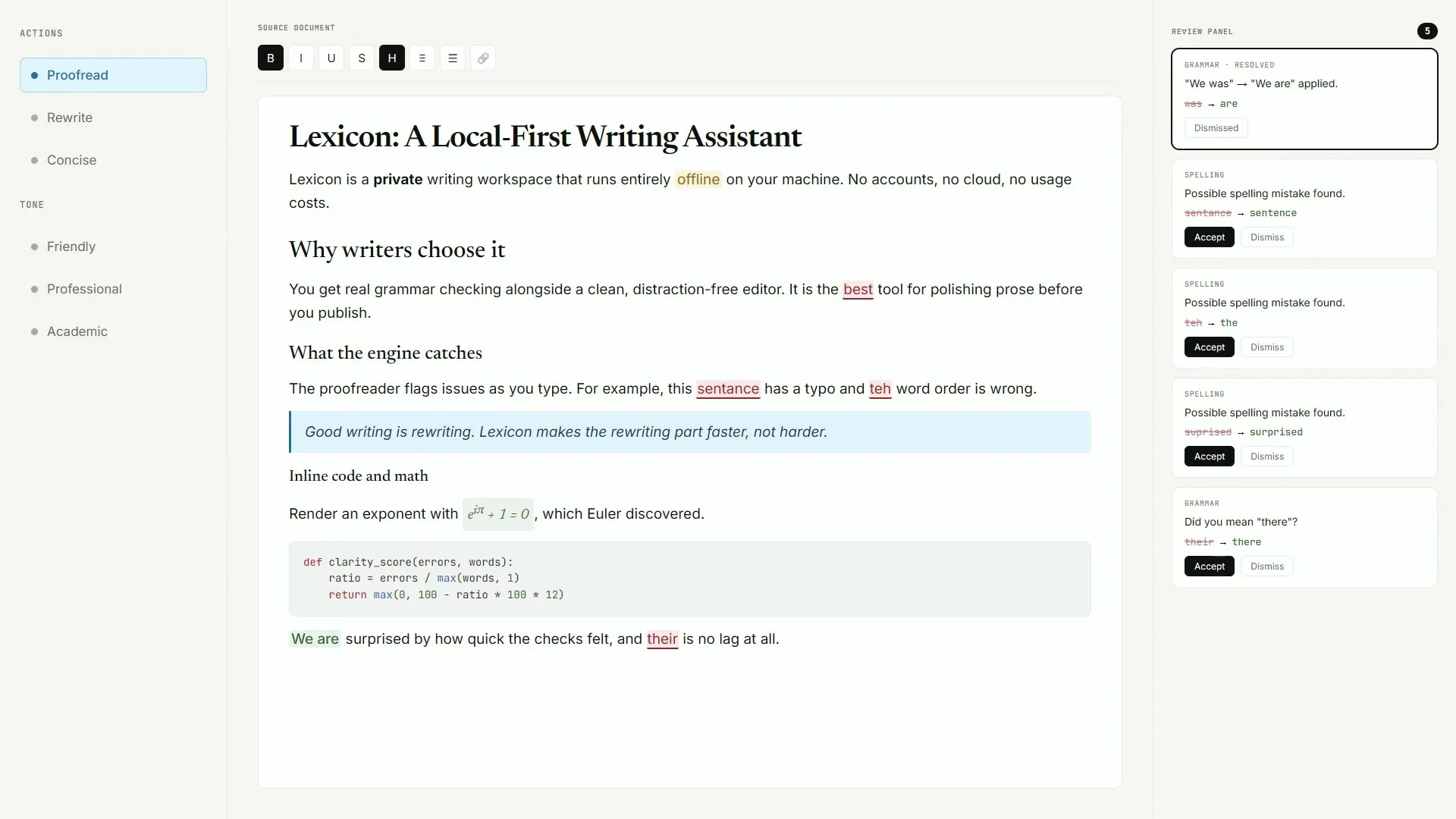
Your first hour with a local grammar check should end with Lexicon proving one proofread offline. Lexicon from AashishH15/Lexicon does that after you install Lexicon_*_x64-setup.exe on Windows (or the matching macOS dmg / Linux deb). No winget or brew package id was found, so Releases stays the door.
Work the eight steps below in order. They match the HowTo schema on this page and the habits in first run and Windows install.
- Confirm the Releases source. Open AashishH15/Lexicon Releases and confirm Lexicon_*_x64-setup.exe (or your matching dmg or deb) before you run anything for this grammar check desk.
- Run the installer for your OS. On Windows run the x64 setup. On macOS open the matching dmg. On Linux install Lexicon_*_amd64.deb with sudo dpkg -i.
- Launch Lexicon. Start Lexicon from the Start menu, Applications, or desktop launcher and wait for the editor window.
- Open a short draft. Paste three to five sentences you already understand so the grammar check pass has real text to mark.
- Run proofread once. Use the local proofreading tools so squiggles and suggestion cards appear. The LanguageTool engine does not require the optional AI model.
- Apply or dismiss one suggestion. Click a suggestion card once so you see how apply and dismiss behave before you trust a long manuscript.
- Bookmark Releases. Save the GitHub Releases URL for the next Lexicon_* bump instead of searching grammar check again.
- Decide on models later. Only after one proofread works, consider Light or Standard local AI downloads for rewrite tools.
Prove the suggestions once
The review panel shows suggestion cards tied to the editor. If a mark looks wrong, dismiss it and add the word to the personal dictionary when it is a proper name. That beats chasing a second installer for grammar check.
Settings worth opening
Language, font size, line spacing, and keyboard shortcuts live in Settings. Skim those topics so the window matches how you write. You do not need cloud sync or an account for ordinary proofreading work.
Checkpoint: one grammar check pass shows suggestions and the Releases URL is bookmarked.
What to skip in hour one
- Invented winget or brew commands
- Random SEO “writing assistant” installers
- Downloading both AI models before the first proofread
- Deleting app data to “save space” before updates
macOS dmg and Linux deb exist on the same tag for other devices. This hour still starts with the Windows-primary door for most desks searching grammar check. Details: this computer, update uninstall, home.
Ticket notes
Desk teams should write the installer filename beside the OS version on the ticket. That boring note is how the next person updates Lexicon without searching the web for grammar check again.
When launch fails
If the window fails to start, re-download the named asset from GitHub Releases rather than chasing registry fixes. Unsigned builds recover from a clean Releases fetch faster than from half-copied portal files.
Prompt honesty
When SmartScreen or Gatekeeper warns, re-check the path. If the warning cites an unexpected location, stop and re-download from GitHub Releases. Do not accept a second EXE from a writing portal that ranks for grammar check.
After proofread
After the proofread, optionally try rewrite tones later using the local models guide. Hour one only needs proofreading. Keep the habit small so the desk trusts the tool.
Shared PCs
Parents setting up a shared PC can pin a shortcut named clearly and leave the browser tool URL in a note for locked profiles. Prefer one Lexicon install over three competing writing assistants.
Support questions
Support questions worth asking: which asset name, which URL, did SmartScreen or Gatekeeper appear, and did one suggestion card show. Those four answers solve most first-hour grammar check tickets.
Re-verify on new tags
Re-verify facts when a new v* tag ships. Proof Quill bumps lastVerified after checking assets again. Upstream remains AashishH15/Lexicon under MIT.
Offline clubs
Offline clubs can keep a verified copy of the setup only after the size matches the live Releases list on imaging day. Re-check each semester because tags move.
Travel and labs
Travel laptops benefit from the same Releases bookmark. Lab images should prove one local grammar check pass after every reimage before calling the machine ready.
Keep the door boring
- Prefer AashishH15/Lexicon Releases for every grammar check bump
- Write the asset name beside the OS version on the ticket
- Prove one local proofread after reimage or travel setup
Soft parks stay parked
No winget package id and no Homebrew cask for this Lexicon writing app were found on the research date. Prefer named Releases assets instead of inventing package manager doors for grammar check installs on shared desks.
Desk checklist
- Confirm the GitHub Releases URL for AashishH15/Lexicon
- Match Lexicon_* filenames to your operating system
- Handle SmartScreen or Gatekeeper prompts honestly
- Run one grammar check proofread before optional AI models
Shared machine notes
Family PCs, club laptops, and classroom images all need the same boring grammar check note: which file, which tag, and who proved the first pass. Keep browser writing tools as a fallback until the local habit sticks for the whole room.
Checkpoint: one grammar check proofread works and Releases stays bookmarked.
Frequently asked questions
What should I do in the first hour with grammar check?
Install Lexicon from GitHub Releases, open a short draft, prove one local proofread, then bookmark AashishH15/Lexicon Releases. Skip inventing winget or brew commands; none were found for this writing app on the research date.
Do I need the AI model for grammar check?
No. Proofreading uses the bundled LanguageTool engine and works without downloading Light or Standard models. Add models only when you want rewrite and tone tools after the first proofread. Prefer AashishH15/Lexicon GitHub Releases for Lexicon_*_x64-setup.exe on Windows or the matching macOS dmg and Linux deb, then prove one local grammar check proofread before optional AI models.
What if SmartScreen or Gatekeeper appears?
Confirm the file still came from github.com/AashishH15/Lexicon/releases. Upstream documents unsigned Windows and macOS builds. Use More info → Run anyway on Windows, or Control-click Open on macOS, when you trust that door.
Do I need an account for grammar check?
No. Lexicon does not require a writing-cloud account for the desktop path after install. Drafts stay local for ordinary grammar check work. Prefer AashishH15/Lexicon GitHub Releases for Lexicon_*_x64-setup.exe on Windows or the matching macOS dmg and Linux deb, then prove one local grammar check proofread before optional AI models.
Where do I go after the first hour?
Use the first-run guide, local models guide, and update guide linked from home. Keep the Releases URL on the machine ticket for the next grammar check bump. Prefer AashishH15/Lexicon GitHub Releases for Lexicon_*_x64-setup.exe on Windows or the matching macOS dmg and Linux deb, then prove one local grammar check proofread before optional AI models.